


How to Monitor Warehouse Temperature and Humidity in Real Time

Manual clipboard checks miss overnight temperature swings and humidity spikes between loading dock deliveries. Wireless SensMax monitoring automates round-the-clock tracking, sends instant alerts, and builds exportable compliance logs across every storage zone.
A delivery bay door stays propped open for twenty minutes during an evening shift, or a chiller fan loses efficiency over a long weekend. If your warehouse still relies on manual clipboard checks once or twice a day, nobody notices the shift until cardboard cartons soften, condensation forms on metal spare parts, or a batch of temperature-sensitive stock fails incoming quality inspection.
Automated warehouse climate tracking removes those blind spots. Instead of walking aisles with handheld meters, facility and operations managers get continuous readings from every storage zone, instant threshold alerts, and clean historical records ready for customer or regulatory audits.
Where Warehouse Temperature and Humidity Risks Start
Large storage halls rarely maintain one uniform climate. Air near loading docks reacts quickly to outdoor weather, upper pallet racking runs warmer than floor-level aisles, and chilled compartments experience sharp spikes whenever forklifts move in and out. Tracking a single thermostat near the warehouse office leaves high-value inventory unprotected.
Different goods fail under different environmental stresses:
- Food and beverage stock: Rising humidity encourages mold on packaging, while warm spots shorten shelf life across dry and chilled goods.
- Pharmaceuticals and healthcare supplies: Even brief temperature excursions outside approved limits can trigger mandatory quarantine or stock write-offs.
- Electronics and metal spare parts: High relative humidity causes condensation and corrosion long before visible water damage appears.
- Paper, packaging, and household chemicals: Moisture swings warp labels, weaken corrugated boxes, and clump powdered materials.

Choosing the Right Wireless Sensors for Each Storage Zone
Running data and power cables across active forklift aisles slows down deployment and complicates future rack reconfigurations. Battery-powered wireless sensors solve this by mounting directly at the exact height and location where your inventory sits, running on batteries for up to 2 years with minimal maintenance.
For most facilities, a warehouse temperature and humidity monitoring system comes down to matching two sensor types to the physical zones on site:
- Ambient storage halls and dry racks: The SensMax ENS210 wireless temperature and humidity sensor measures both air temperature and relative humidity in open aisles, mezzanine levels, and shipping bays.
- Cold rooms, chillers, and enclosed cabinets: The SensMax PT100 wireless temperature sensor with external probe places a thin measurement probe inside the cold compartment while the wireless transmitter mounts safely outside the insulated wall for reliable radio signal strength.
Both sensor models transmit readings over long-range wireless radio to a central SensMax data gateway connected to your local network or internet router. Because sensors do not depend on warehouse Wi-Fi coverage inside metal racking, signals stay stable across wide halls and multiple rooms, and new measurement points can be added in minutes whenever storage layouts change.

How Automated Alerts and Reporting Replace Paper Logs
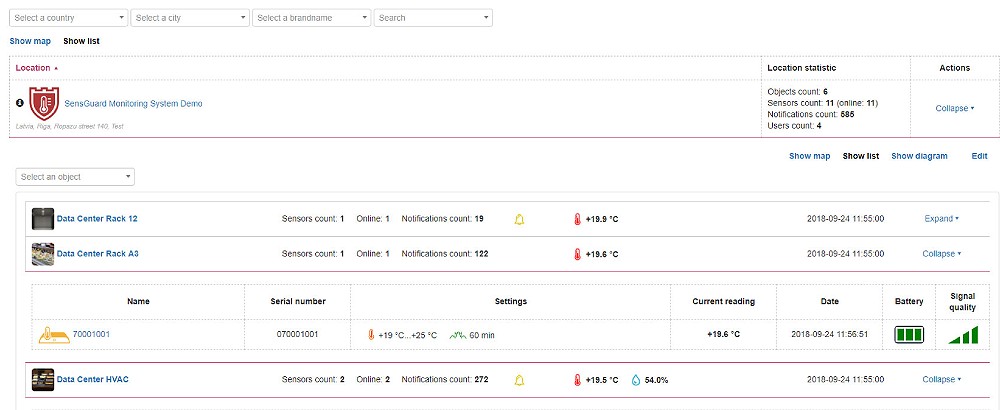
Collecting readings is only useful if your team hears about a problem early enough to act. In the SensMax online temperature and humidity monitoring software, warehouse managers set individual minimum and maximum thresholds for each sensor or storage zone.
When a cooling unit falters or humidity climbs above safe limits, the system sends automated notifications by email or Telegram to the designated shift lead or maintenance technician. Instead of discovering spoiled goods on Monday morning, staff can move pallets, close a bay door, or dispatch HVAC service within minutes.
Centralized reporting also removes hours of manual spreadsheet work every month:
- Round-the-clock visibility: Check live and historical readings across one warehouse or an entire regional network from any browser.
- Zone-specific tolerance rules: Apply tighter temperature bands to pharmaceutical or chilled aisles while keeping broader limits near loading bays.
- Audit-ready exports: Download time-stamped temperature and humidity logs for quality inspections, HACCP checks, or client compliance reviews.
Practical Steps to Roll Out Warehouse Monitoring
You do not need to equip every square meter of a facility with a sensor to get reliable protection. Start by mapping the points where product sensitivity and environmental risk intersect.
- 1. Identify high-risk microclimates: Place sensors near dock doors, exterior walls exposed to direct afternoon sun, top-level pallet racks, and inside every cold chamber.
- 2. Set realistic alert delays: Configure a short grace period on loading bay doors so routine 5-minute pallet transfers do not flood your team with unnecessary alerts.
- 3. Assign clear alert ownership: Route daytime alerts to floor supervisors and overnight or weekend alerts to on-call facility maintenance staff.
- 4. Verify report formats early: Run a sample export before your next scheduled quality or safety audit so your team knows exact file formats are ready on demand.
Key Takeaways
- Manual spot checks miss overnight HVAC failures, weekend drift, and sharp microclimate differences between loading bays and high-bay racks.
- Wireless SensMax ENS210 sensors cover ambient temperature and humidity, while SensMax PT100 probe sensors monitor cold rooms and enclosed chillers without signal loss.
- Automated email and Telegram notifications alert warehouse teams the moment conditions cross safe zone thresholds.
- Centralized online reporting maintains continuous historical records for HACCP, pharmaceutical, and customer quality audits.
Frequently Asked Questions
Where should temperature and humidity sensors be placed in a warehouse?
Mount sensors where conditions shift fastest and where sensitive stock sits, rather than next to office thermostats. Key locations include loading dock doors, upper pallet racking, exterior walls, and inside chilled or climate-controlled rooms.
How long do wireless warehouse sensors operate on batteries?
SensMax wireless temperature and humidity sensors are designed for multi-year battery operation, typically running up to 2 years before replacement is needed. This allows quick non-invasive mounting across racks and walls without laying power cables.
Can I monitor both ambient halls and walk-in chillers in one system?
Yes. You can combine SensMax ENS210 sensors for open ambient areas with SensMax PT100 external probe sensors for walk-in freezers or insulated cabinets, viewing every zone inside the same reporting dashboard.
How does the team get notified if temperature goes out of range?
Managers define custom minimum and maximum limits for each sensor or warehouse zone. If a reading crosses those limits, the system sends real-time notifications via email or Telegram so staff can intervene before inventory is damaged.
Planning climate monitoring for a distribution center, cold room, or multi-zone warehouse? Share your floor layout, storage zones, and target temperature or humidity ranges through the inquiry form below, and our team will recommend the right SensMax sensor and gateway configuration for your facility.
Ask your question
Tell us briefly about your project - our engineers will recommend the optimal configuration and send a quote.