
SensMax L3 TS Real Time Customer Survey Button
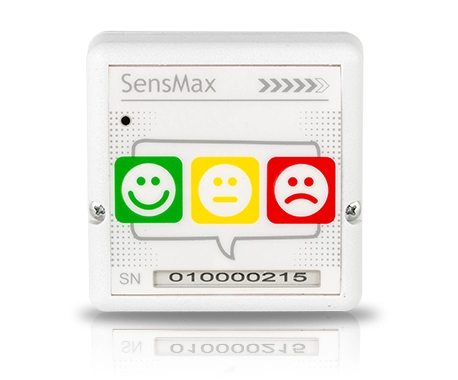
- Operation principle:Three feedback buttons with smileys - happy, sad, disappointed
- Internal memory :1000 recordings
- Power supply:AA batteries
- Battery life:Up to 2 years
- Communication range:Up to 800m
- Additional feature:real-time data delivery to a server
Wireless real-time customer feedback device with instant reporting, NPS calculation, and up to 2 years battery life.
SensMax L3 TS Real-Time Customer Survey Button
The SensMax L3 TS real-time customer survey button is a wireless feedback device for collecting customer satisfaction data at service points, washrooms, checkout areas, reception desks and public facilities. Visitors can give feedback by pressing one of three smiley buttons: happy, neutral or sad.
Each button press is transmitted to the SensMax online reporting portal through a compatible SMX TS real-time gateway. This allows service teams to see feedback results immediately, track satisfaction levels and react faster when service quality changes.
L3 TS is battery-powered, wireless and easy to install on a desktop stand or wall surface. It is suitable for locations where instant feedback is more useful than periodic survey reporting, such as airports, shopping malls, banks, public washrooms, retail stores, offices and service centres.
Wireless real-time customer survey button with three smiley icons for instant feedback collection.
At a Glance
- Real-time customer feedback with three smiley buttons.
- Happy, neutral and sad responses for simple service quality surveys.
- Wireless connection to a compatible SensMax SMX TS gateway.
- Instant data transmission to the SensMax online reporting portal.
- Internal backup memory for up to 1000 survey records.
- Battery-powered operation with 2x AA batteries.
- Up to 2 years battery life under normal use conditions.
- Desktop or wall installation depending on the feedback point.
- Indoor IP54 enclosure for service desks, washrooms, retail and public spaces.
- Useful for NPS and service quality monitoring in real time.
How the L3 TS Survey Button Works
The L3 TS button gives visitors a simple way to rate their experience immediately after using a service. The customer presses one of three physical buttons with smiley icons, and the response is registered by the device.
The button sends survey data by wireless radio channel to a compatible SensMax SMX TS gateway. The gateway forwards the data to the SensMax online portal, where results can be viewed in dashboards and reports.
L3 TS versions are designed for real-time transmission. Depending on system settings, responses can be sent instantly or in short 5-minute batches. If communication is temporarily unavailable, the button can store up to 1000 records and synchronize them later.
Real-Time Feedback Reporting
Real-time feedback helps service teams see customer satisfaction changes during the day. Instead of waiting for manual surveys or monthly reports, managers can monitor results continuously and respond faster when negative feedback increases.
In the SensMax reporting portal, survey data can be reviewed by hour, day, week, location or device. This makes it easier to compare service points, track satisfaction trends and identify areas that need attention.
Survey data can also be used together with SensMax people counting data. This helps compare the number of visitors with the number of feedback responses and understand satisfaction levels in relation to actual visitor traffic.
Installation
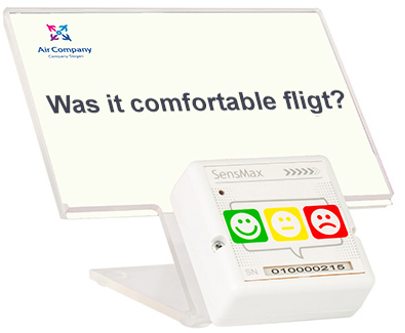
The L3 TS button is designed for quick indoor installation. It can be placed on a desktop plastic holder with a printed survey question or mounted on a wall or flat surface at visitor arm level.
Desktop installation is suitable for checkout areas, reception desks, service counters and information points. Wall installation is useful for washrooms, corridors, exit areas and public service zones where visitors should be able to give feedback quickly.
The button is powered by two AA batteries and does not require cabling at the feedback point. Before operation, the device must be paired with a compatible SMX TS gateway.
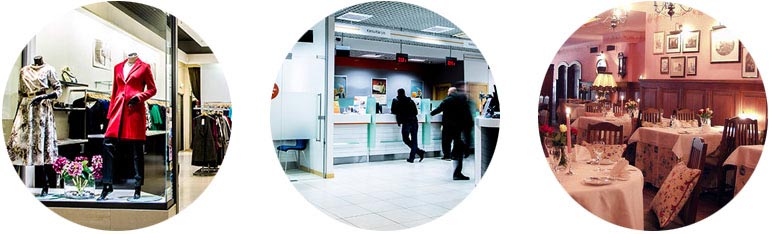
Typical customer feedback locations include service desks, washrooms, retail stores and public spaces.
Compatible Gateways
L3 TS real-time survey buttons require a compatible SensMax SMX TS gateway. The gateway receives button presses by radio channel and sends the data to the online reporting portal.
- SensMax SMX LR TS gateway for L3 LR TS buttons.
- SensMax SMX SLR TS gateway for L3 SLR TS buttons.
The selected button and gateway must match the same range class and radio frequency. One SMX TS gateway can receive data from up to 20 TS loyalty buttons.
Typical Applications
SensMax L3 TS is suitable for service points where quick and easy customer feedback is needed.
- Retail stores for customer satisfaction feedback after checkout or service interaction.
- Shopping malls for feedback at entrances, information desks, washrooms and service zones.
- Airports and transport hubs for passenger feedback in security, check-in, toilets and service areas.
- Banks and service centres for branch-level service quality monitoring.
- Public washrooms for cleanliness feedback and cleaning service improvement.
- Offices and smart buildings for facility satisfaction monitoring.
- Museums, libraries and public buildings for visitor service feedback.
Business Benefits
L3 TS helps organizations detect service quality issues as they happen. Real-time feedback makes it easier to react during the same day, rather than reviewing problems only after a reporting period has ended.
The system helps managers compare locations, monitor staff performance, improve cleaning schedules, measure customer satisfaction and support service quality decisions with simple, easy-to-understand feedback data.
- collect instant feedback at customer touchpoints;
- identify negative feedback peaks quickly;
- compare service quality between locations or departments;
- track satisfaction trends by hour, day and week;
- combine feedback data with visitor traffic data;
- support NPS and customer loyalty reporting.
Example in Action
A shopping mall installs L3 TS survey buttons near washrooms and service desks. Visitors can quickly rate their experience by pressing one of the three smiley buttons. The data is sent through SMX TS gateways to the SensMax online portal.
When negative feedback increases in one washroom area, the facility team can react during the day and adjust cleaning or maintenance response. Over time, the mall can compare satisfaction between zones and use the reports to improve service quality.
Model Variants
| Model | Frequency | Communication range | Compatible gateway | Typical use |
|---|---|---|---|---|
| SensMax L3 LR TS | 868 MHz | Up to 150 m | SensMax SMX LR TS | Medium-size sites, stores, washrooms and service areas |
| SensMax L3 SLR TS | 868 MHz | Up to 800 m | SensMax SMX SLR TS | Large premises, shopping malls and distributed service locations |
Technical Details
| Device model | SensMax L3 TS real-time customer survey button |
|---|---|
| Technical documentation and installation manuals | https://docs.sensmax.eu/online-visitor-counting-systems/loyalty-buttons-datasheet/ |
| Application | Real-time customer feedback collection, real-time satisfaction monitoring, NPS reporting, service quality monitoring, washroom feedback, retail survey button, airport feedback device, bank service feedback and shopping mall customer surveys |
| Operation principle | Pressing one of three physical smiley feedback buttons |
| Button options | Happy, neutral and sad feedback buttons |
| Model variants | SensMax L3 LR TS, SensMax L3 SLR TS |
| Operating mode | Real-time transmission or 5-minute batches, depending on system configuration |
| Communication range | L3 LR TS: up to 150 m; L3 SLR TS: up to 800 m |
| Radio frequency | 868 MHz |
| Backup memory | Up to 1000 survey records |
| Enclosure | White ABS plastic |
| Protection class | IP54 |
| Operating conditions | Indoor use |
| Operating temperature | 0°C to +55°C |
| Power supply | 2x AA 1.5V alkaline batteries |
| Battery lifetime | Up to 2 years |
| Supported gateways | SensMax SMX LR TS, SensMax SMX SLR TS |
| Dimensions | 67 × 67 × 25 mm |
| Weight | Approximately 50 g without batteries |
| Installation options | Desktop holder with printed question sheet or wall installation at visitor arm level |
Scope of Delivery
- Wireless L3 TS button unit
- 2x AA 1.5V alkaline batteries
- Double-sided tape for mounting
- Desktop plastic holder for printed question sheet
FAQ L3 TS Real-Time Customer Survey Button
- Is L3 TS a people counting sensor?
No. L3 TS is not a people counting sensor. It is a wireless customer survey button for collecting feedback responses. - How many feedback options does L3 TS have?
The button has three physical smiley options: happy, neutral and sad. - Does L3 TS send responses in real time?
Yes. L3 TS versions are designed for real-time transmission through a compatible SMX TS gateway. - Which gateway does L3 TS require?
L3 LR TS works with SMX LR TS. L3 SLR TS works with SMX SLR TS. - How far can L3 TS communicate with the gateway?
L3 LR TS has a communication range of up to 150 m. L3 SLR TS has a communication range of up to 800 m. - What happens if communication is interrupted?
The device can store up to 1000 survey records and synchronize them later when communication is restored. - Does L3 TS have a spam filter?
No. The spam filter is available for standard batch L3 models. L3 TS real-time models are designed to send each individual response instantly. - How long does the battery last?
The device operates for up to 2 years using two AA batteries, depending on usage and battery quality. - Where can L3 TS be installed?
It can be placed on a desktop holder or mounted on a wall or flat surface at visitor arm level.
Ready to Get Started?
Need real-time customer feedback for retail stores, washrooms, service desks, airports, banks or public buildings? SensMax can help you choose the correct L3 TS button and SMX TS gateway configuration for your site.
Share your location type, number of feedback points, distance to the gateway and reporting requirements, and we will help define the correct setup.
Request a quote for SensMax L3 TS Survey Button
This device appears in those solutions: