
SensGuard RC1 Wireless Alarm System Control Key Chain
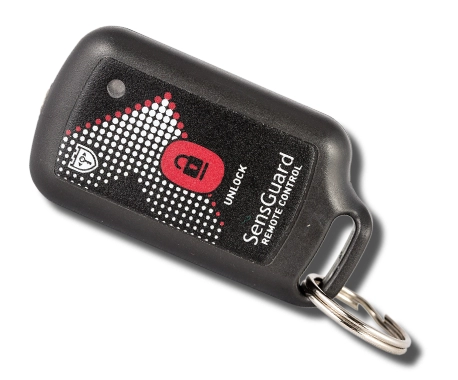
- Range of communication:Up to 150m
- Signal encryption:AES-128
- Battery life:Up to 5 years
- Qty of control zones:Managing up to 10 alarm zones
Wireless alarm control key chain for quick arming/disarming of sensors in retail, jewelry, and museum security systems.
SensGuard RC1 Wireless Control Key
The SensGuard RC1 Wireless Control Key is a compact remote key fob for arming and disarming SensGuard optical alarm system zones. It is used by staff to safely open protected showcases, move secured objects or access exhibits without disabling the whole alarm system.
RC1 is designed for retail stores, jewelry shops, mobile phone stores, museums, galleries, exhibitions and other locations where protected objects or showcases need to be accessed several times during the working day.
The control key communicates wirelessly with the SensGuard alarm receiver at 868 MHz and uses AES-128 encryption for secure alarm system control. It supports convenient operation of up to 10 independent control zones with multiple sensors in each zone.
Wireless control key for fast arming and disarming of SensGuard alarm zones.
At a Glance
- Wireless alarm control key for SensGuard optical alarm systems.
- One-button arming and disarming for daily staff operations.
- Controls up to 10 independent zones through the SensGuard alarm receiver.
- Up to 20 sensors per zone, depending on receiver configuration.
- Up to 10 remote controls per zone for flexible staff access rights.
- 868 MHz wireless communication with up to 150 m line-of-sight range.
- AES-128 encrypted radio channel for secure system control.
- Built-in non-rechargeable lithium battery with up to 5 years battery life.
- Compact key fob design for daily use by retail, museum or gallery staff.
- No wiring required, ready to use after pairing with the alarm receiver.
How the RC1 Control Key Works
The RC1 key fob allows staff to control SensGuard alarm zones with a button press. Before opening a showcase, moving a protected object or accessing an exhibit, the user presses the unlock button to temporarily disarm the paired zone.
After pressing the unlock button, the user has 10 seconds to open each monitored showcase. If several showcases need to be opened, the button should be pressed before each opening.
If more than one showcase is opened at the same time during the unlock period, the alarm system activates the alarm. After the work with the object is finished, the system automatically returns to armed mode.
Zone Control and Access Rights
RC1 works through the central SensGuard alarm receiver. Zone bindings and access rights are configured on the receiver, allowing each key fob to control a specific zone or several zones depending on the site setup.
Up to 10 independent control keys can be paired to each of the 10 control zones. This allows managers to give different access rights to different staff members, departments or security teams.
Typical Use in Daily Operations
In retail and museum environments, staff often need to access protected showcases or objects during opening hours. RC1 makes this process quick and controlled, without turning off the full alarm system.
For example, a salesperson can temporarily unlock only the jewelry showcase zone while all other zones remain protected. Museum staff can access one exhibit or display area without disabling alarms on the rest of the gallery.
Compatible Alarm System Components
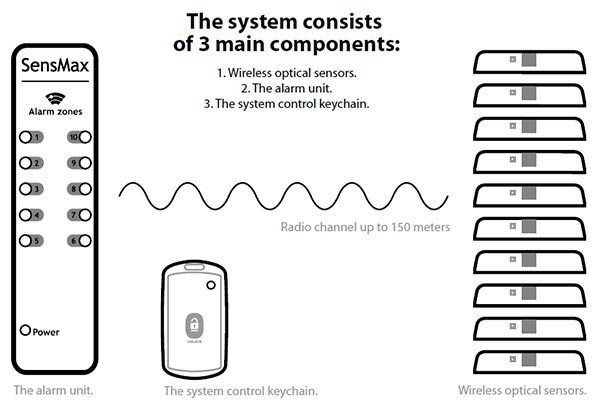
The SensGuard RC1 key fob works as part of the SensGuard optical alarm system. It is used together with the SensGuard X1 Alarm Receiver and SensGuard VCNL4010 Optical Security Sensors.
- SensGuard VCNL4010 Wireless Security Sensor - wireless optical security sensor with built-in battery.
- SensGuard X1 Alarm Receiver - central receiver with sound and light indication for alarm zones.
- SensGuard RC1 Wireless Control Key - compact remote control for locking and unlocking the system.
The SensGuard X1 receiver supports up to 10 independent control zones, up to 20 sensors per zone and up to 200 sensors in total. Up to 10 RC1 remote controls can be used per control zone.
Typical Applications
SensGuard RC1 is suitable for sites where staff need controlled access to protected objects, showcases, windows, doors or display zones.
- Retail showcases for jewelry, electronics, watches, luxury goods and other high-value products.
- Mobile phone and electronics stores where products are accessed regularly during sales.
- Museums and art galleries for temporary access to protected paintings, objects and exhibition zones.
- Shop windows and doors where alarm sensors must be disarmed for staff access.
- Temporary exhibitions where staff need a quick way to manage protected objects during events.
- Multi-zone premises where different staff members need access to different control zones.
Business Benefits
RC1 helps staff work with protected objects without reducing the security of the whole site. Individual alarm zones can be controlled quickly, while other showcases, rooms or display areas remain armed.
This reduces operational delays, lowers the risk of human error and keeps object protection active during daily sales, maintenance or exhibition work.
- arm and disarm alarm zones quickly during daily operations;
- give staff access only to required zones;
- avoid disabling the full alarm system for simple showcase access;
- support retail, museum and gallery staff workflows;
- use encrypted wireless control without cabling;
- keep protected objects secure while staff work with selected items.
Example in Action
A jewelry store uses SensGuard VCNL4010 sensors to protect several showcases. Each showcase group is assigned to a separate alarm zone on the SensGuard receiver.
When staff need to show an item to a customer, they use the RC1 control key to temporarily unlock the required zone. The showcase can be opened without triggering the alarm, while all other zones remain protected. After the access period, the system automatically returns to armed mode.
Technical Details
| Device model | SensGuard RC1 Wireless Control Key |
|---|---|
| Technical documentation and installation manuals | https://docs.sensmax.eu/sensguard-alarm-system/rc1-key-fob-datasheet |
| Application | Wireless alarm system control, showcase alarm control, window and door alarm control, object protection control, gallery alarm control, museum exhibit access control and retail security system control |
| Supported devices | SensGuard VCNL4010 Wireless Security Sensor and SensGuard X1 Alarm Receiver |
| Communication range | Up to 150 m in clear line-of-sight conditions |
| Radio frequency | 868 MHz |
| Signal encryption | AES-128 secure channel |
| Control zones | Control up to 10 zones, up to 20 sensors in each zone |
| Remote controls per zone | Up to 10 independent control keys per control zone |
| Unlock operating rule | After pressing the unlock button, the user has 10 seconds to open each monitored showcase. If more than one showcase is opened simultaneously, the system activates the alarm. |
| Power supply | Built-in lithium battery, IEC86-4 safety standard, 400 mAh, non-rechargeable |
| Battery life | Up to 5 years |
| Dimensions | 65 × 35 × 17 mm |
| Compliance | CE and RoHS |
Scope of Alarm System Components
| Model | Description |
|---|---|
| SensGuard VCNL4010 Wireless Security Sensor | Wireless optical security sensor with built-in battery for object protection |
| SensGuard X1 Alarm Receiver | Central receiver supporting up to 10 independent control zones, up to 20 sensors per zone and up to 200 sensors in total. Alerts with sound and light indication. |
| SensGuard RC1 Wireless Control Key | Compact remote control for locking and unlocking the system, up to 10 remote controls per control zone |
FAQ SensGuard RC1 Wireless Control Key
- Is SensGuard RC1 an alarm sensor?
No. RC1 is not an alarm sensor. It is a wireless control key used to arm and disarm SensGuard alarm zones. - Which system does RC1 work with?
RC1 works as part of the SensGuard optical alarm system together with SensGuard VCNL4010 sensors and the SensGuard X1 Alarm Receiver. - How many zones can RC1 control?
RC1 can control up to 10 independent zones through the SensGuard alarm receiver, depending on configuration. - How many sensors can be used in one zone?
The SensGuard receiver supports up to 20 sensors per zone. - How many RC1 control keys can be used per zone?
Up to 10 RC1 remote controls can be paired to each control zone. - What happens after the unlock button is pressed?
The user has 10 seconds to open each monitored showcase. After the work is finished, the system automatically returns to armed mode. - Can several showcases be opened at the same time?
If more than one monitored showcase is opened simultaneously during the unlock period, the alarm system activates the alarm. - What is the wireless range?
The communication range is up to 150 m in clear line-of-sight conditions. - Is the wireless signal encrypted?
Yes. RC1 uses AES-128 encrypted wireless communication. - How long does the battery last?
The built-in non-rechargeable lithium battery provides up to 5 years of operation.
Ready to Get Started?
Need wireless control keys for a SensGuard alarm system in a retail store, museum, gallery, exhibition or showroom? SensMax can help you choose the right number of RC1 key fobs, alarm zones and sensors for your site.
Share the number of zones, protected showcases or objects, staff access requirements and approximate distances to the receiver, and we will help define the correct setup.
Request a quote for SensGuard RC1 Control Key
This device appears in those solutions: