


How People Counting Software Works in Retail Stores and Malls

When daily revenue dips at a retail branch, cash register totals only tell half the story. Without visitor data, a store manager cannot see whether fewer shoppers walked through the door or whether plenty of visitors arrived and left without buying. People counting software closes that blind spot by turning raw entrance crossings into clear traffic reports that teams can act on every day.
Instead of guessing why Tuesday afternoons feel quiet or which entrance of a shopping mall draws the largest crowd, retail operations teams get consistent visitor counts across every hour, day, and location.
From Doorway Sensor to Central Dashboard
People counting software works as the reporting hub of a connected counting system. Hardware at the entrance records movement, while the software collects, cleans, and presents those numbers in an easy-to-read format.
- Capture at the entrance: Bidirectional units such as the SensMax D3 wireless people counting sensor mount discreetly at the doorway and record separate incoming and outgoing crossings.
- Local data protection: Sensors store timestamped readings in internal memory so brief power or network interruptions do not erase historical counts.
- Gateway collection: A compact SensMax SMX data gateway gathers traffic records wirelessly from sensors across the floor and forwards them over LAN or Wi-Fi.
- Automated reporting: The SensMax people counting software aggregates raw timestamps into hourly, daily, weekly, and monthly metrics ready for review.

Reading Hourly, Daily, and Monthly Traffic Reports
Once data reaches the reporting dashboard, managers do not need to sort through raw logs. The software organizes visitor counts into visual charts tailored to different operational questions.
Hourly line charts map how footfall rises and falls from opening time to closing time. Store managers can spot exact peak windows, quiet mid-morning lulls, and late-evening drop-offs at a glance.
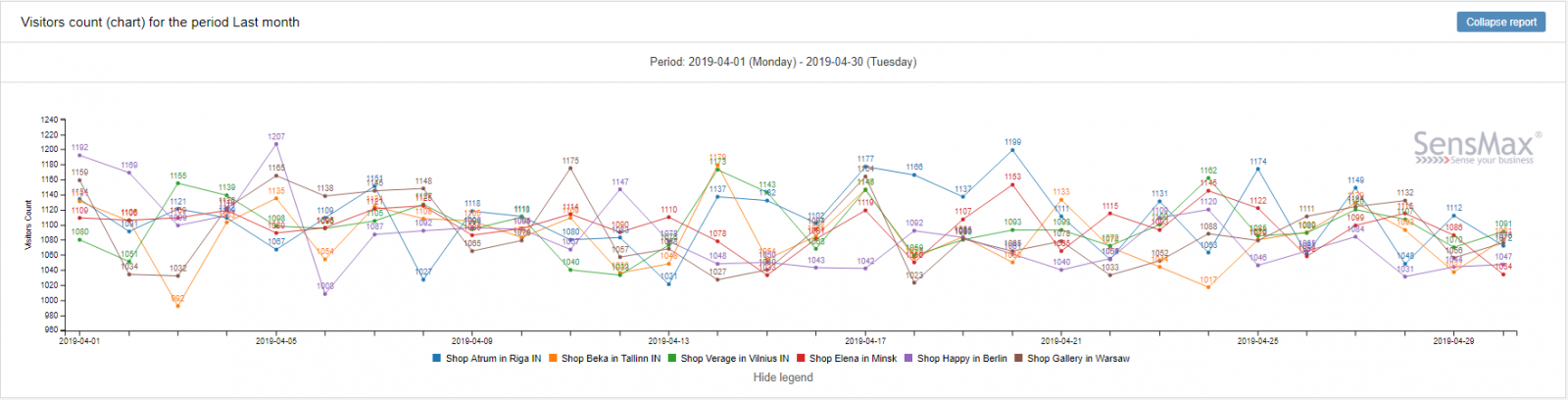
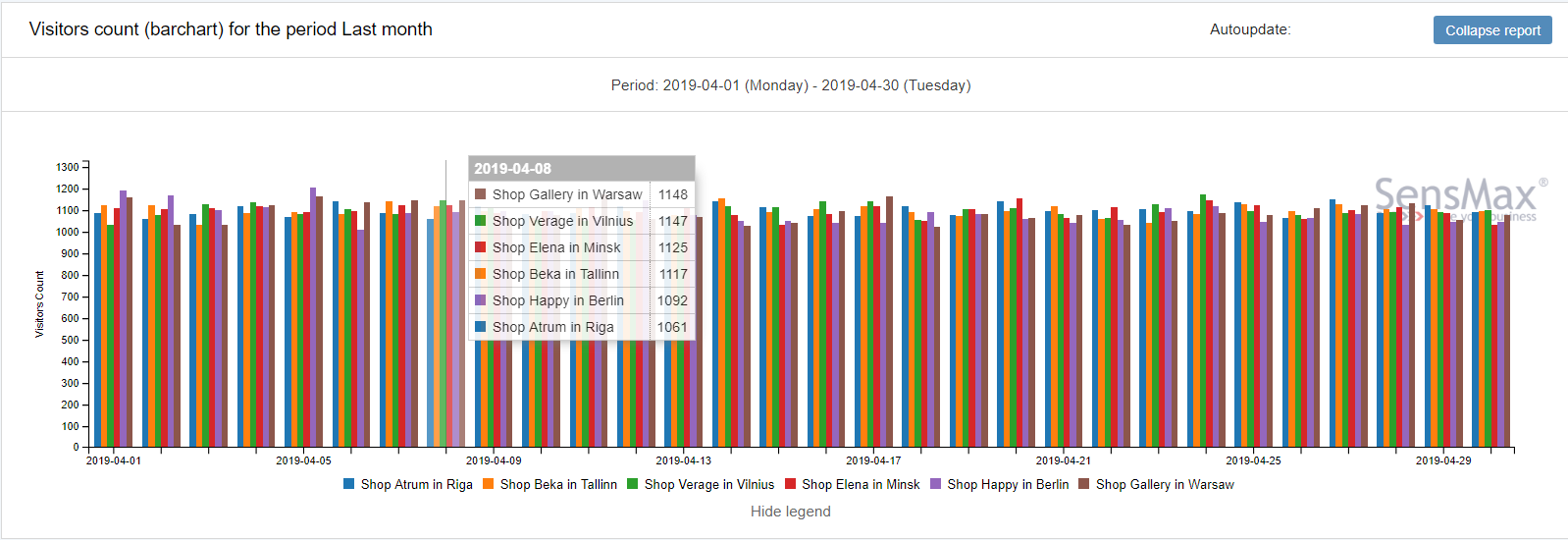
Bar charts make longer-term comparisons straightforward. Operations leads use them to compare Mondays against Saturdays, review seasonal traffic shifts over the year, or benchmark visitor totals across multiple entrances and branches.
Turning Visitor Counts Into Daily Retail Decisions
Traffic numbers create real value when store managers connect them to staffing, merchandising, and sales targets. Across retail stores and chains, teams rely on four core applications:
- Measure true conversion rates: Divide daily POS transactions by incoming visitor counts. If footfall stays steady while conversion drops, managers know to inspect queue wait times, stock availability, or floor assistance rather than blaming low street traffic.
- Align shift schedules with peak hours: Instead of spreading staff evenly across the week, store supervisors assign extra associates during busy afternoon and weekend peaks and keep quieter opening hours lean.
- Evaluate campaigns and window displays: Compare entrance traffic before, during, and after a promotion or window refresh to see which initiatives actually bring more shoppers inside.
- Benchmark multi-site performance: Regional managers compare locations on fair terms, spotting high-traffic stores with untapped sales potential alongside quieter branches that convert visitors efficiently.
Automated Reporting and Team Access
Busy retail managers rarely have time to log into a dashboard every morning and build manual spreadsheets. People counting software simplifies routine follow-up by delivering scheduled PDF or CSV reports directly to managers' inboxes on a daily, weekly, or monthly cycle.
Role-based permissions keep data organized across larger organizations. A regional director can review chain-wide summaries across dozens of stores, while individual branch managers only see their own location. When finance or business intelligence teams want visitor counts alongside POS revenue, built-in export tools and API options feed clean traffic totals into existing company dashboards.
Key Takeaways
- People counting software turns raw doorway sensor crossings into structured hourly, daily, and monthly visitor reports.
- Line and bar charts help retail managers spot peak shopping windows, seasonal shifts, and differences between store locations.
- Combining visitor counts with POS transaction data reveals true conversion rates and guides better staffing schedules.
- Scheduled email reports and data exports keep store managers and regional teams informed without manual spreadsheet work.
Frequently Asked Questions
How does people counting software receive data from store entrances?
Wireless doorway sensors record incoming and outgoing crossings and send those counts to a local SensMax data gateway. The gateway forwards the readings over LAN or Wi-Fi into the reporting software automatically.
What happens to visitor data if the store internet connection drops?
Doorway sensors and gateways store recent traffic records in internal memory during temporary network outages. Once the connection returns, stored counts sync automatically so daily reports stay complete.
Can we combine visitor counts with sales data from our POS system?
Yes. Teams can export traffic reports in standard spreadsheet formats or connect via API to pair hourly and daily visitor counts with POS transactions and calculate conversion rates.
Does the software work for both single stores and multi-site retail chains?
Yes. Store managers can monitor a single entrance, while regional teams can group multiple doors, floors, and store branches under one account with role-based permissions.
Want to see how SensMax people counting software and wireless entrance sensors fit your store layout? Share your number of locations, entrance widths, and reporting goals in the inquiry form below, and our team will recommend a practical setup.
Ask your question
Tell us briefly about your project - our engineers will recommend the optimal configuration and send a quote.