


SensMax TAC-B Radar Sensors Support IFTTT Webhook Automation

Facility managers and retail operations teams rarely want footfall data to sit in a report until the next morning. When a meeting room fills up, a washroom passes a busy threshold, or a store entrance experiences a sudden rush, building systems and staff need to react right away.
With native webhook support built into SensMax TAC-B radar sensors, live counting and occupancy events can trigger actions across hundreds of cloud services through IFTTT. Instead of building custom middleware to connect sensor counts to everyday tools, teams can link physical space activity directly to automated workflows.
How IFTTT Webhook Triggers Work on TAC-B Radar Sensors
A webhook is a lightweight HTTP message that a sensor sends automatically when a specific rule is met. When you configure a trigger inside the SensMax TAC-B 3D-W indoor radar, the TAC-B EWP PoE model, or the TAC-B 4G cellular unit, the sensor dispatches a request straight to your IFTTT Webhooks endpoint.
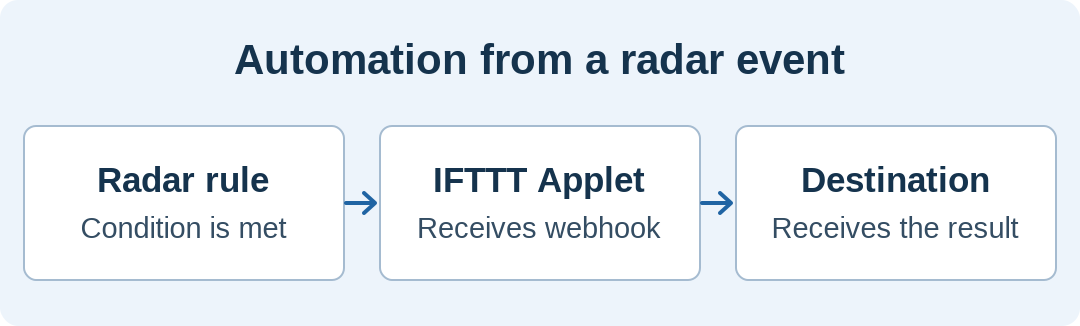
Because the radar handles the trigger logic on the device itself, no local gateway server is required just to forward an alert. Practical automation workflows include:
- Smart lighting and HVAC control: switch lights on or increase ventilation when occupancy rises above zero, and power equipment down once a room clears.
- Demand-based cleaning alerts: send an email, SMS, or team chat notification when a restroom or break area crosses a set number of visits.
- Automatic spreadsheet logging: append timestamped visitor counts or threshold events directly to Google Sheets for shift reviews.
- Service desk and floor notifications: alert managers when incoming footfall surges at a main entrance or checkout zone.
Spatial and Counting Rules Behind Reliable Triggers
Automation is only useful when the underlying detection is dependable. SensMax TAC-B sensors use 60 GHz mmWave radar to track real-time movement trajectories across indoor and outdoor spaces rather than relying on a single doorway beam.
On a wall installation, a TAC-B unit can be mounted up to 6 meters high with a 0 to 45 degree tilt and no blind spot directly beneath the sensor. Depending on site geometry, you can define triggers around specific spatial conditions:
- Directional line crossings: fire webhooks based on virtual IN and OUT counts across entrances, corridors, or open walkways.
- Zone occupancy rules: trigger actions when people enter or leave a defined detection zone, such as a conference room, lobby, or display area.
- High-traffic intervals: track continuous 5-minute Total Flow statistics or Engagement rates without requiring rigid doorway lines.
Because millimeter-wave radar detects movement without cameras, optical lenses, or phone tracking, triggers work reliably in complete darkness, direct sunlight, and privacy-sensitive environments such as washrooms and healthcare waiting rooms. Setup and zone alignment are managed through the sensor web interface or the included SensMax Prism app.
Choosing Between IFTTT Webhooks and MQTT v2.0
System integrators often ask whether to connect TAC-B radar sensors to external platforms via IFTTT webhooks or via MQTT. Both communication paths are built into the TAC-B firmware, and each serves a different operational need.
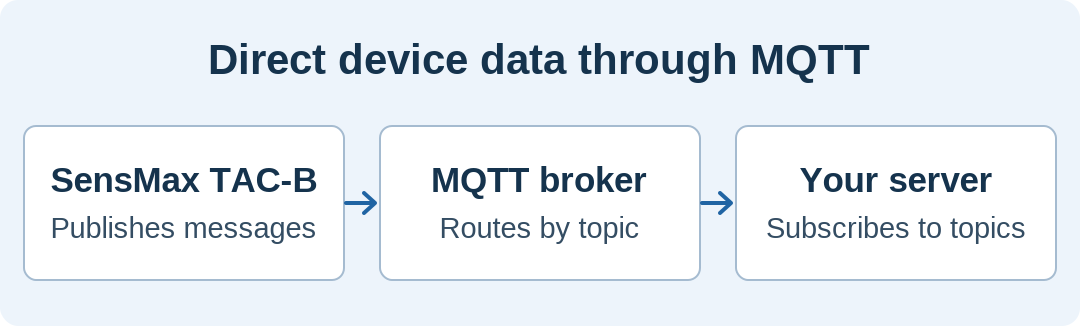
Use this quick comparison to decide which approach fits your site architecture:
- IFTTT webhooks are ideal when store managers or facility teams want fast cloud-to-cloud rules across everyday apps such as Slack, Gmail, Google Sheets, or smart building switches without writing custom code.
- Bidirectional SensMax MQTT v2.0 is the better fit when engineers connect sensors to a local BMS, SCADA system, or enterprise IoT broker that requires Live Telemetry, granular 5-minute data, Hourly Heatmaps, or remote OTA firmware management.
For multi-site deployments, teams can combine both approaches: using central dashboards for long-term analytics while running local triggers for immediate operational actions in smart building and retail environments.
Key Takeaways
- SensMax TAC-B 60 GHz radar sensors send direct HTTP webhook requests to IFTTT whenever user-defined counting or zone rules are triggered.
- Operations teams can automate lighting, HVAC schedules, cleaning notifications, and Google Sheets logs without building custom middleware.
- Anonymous mmWave detection supports both directional IN/OUT lines and spatial zone triggers, operating reliably in dark, bright, or privacy-sensitive areas.
- While IFTTT webhooks simplify cloud app workflows, bidirectional SensMax MQTT v2.0 remains available for BMS, SCADA, and enterprise telemetry integration.
Frequently Asked Questions
Which SensMax TAC-B sensors support IFTTT webhook triggers?
Webhook trigger functionality is supported across the SensMax TAC-B radar line, including the TAC-B 3D-W Wi-Fi indoor model, the TAC-B EWP PoE indoor/outdoor unit, and the TAC-B 4G cellular sensor. Any unit with an active internet connection can reach the IFTTT Webhooks endpoint.
Do I need a local server or hub to connect TAC-B to IFTTT?
No local server is required for IFTTT webhook workflows. Once you enter your IFTTT webhook URL and trigger thresholds in the sensor configuration, the TAC-B device sends the HTTP payload directly when an event occurs.
Can TAC-B sensors trigger actions in privacy-sensitive spaces like restrooms?
Yes. TAC-B sensors use anonymous 60 GHz millimeter-wave radar rather than optical cameras or wireless device tracking, so they contain no personal imagery or identifiers and fit GDPR-compliant facility automation.
When should an integrator choose MQTT v2.0 instead of IFTTT webhooks?
Choose IFTTT webhooks for rapid rule-based automations across cloud apps and messaging tools. Choose bidirectional SensMax MQTT v2.0 when integrating directly with a local building management system, custom data warehouse, or multi-site IoT broker that consumes continuous telemetry.
Planning to automate lighting, occupancy alerts, or facility workflows with SensMax TAC-B radar sensors? Share your site layout, connectivity requirements, and integration goals in the inquiry form below so our technical team can recommend the right TAC-B configuration.
Ask your question
Tell us briefly about your project - our engineers will recommend the optimal configuration and send a quote.